
DEHCR HOME-ARP Supportive Services Data Quality Report
Background
The DEHCR HOME-ARP Supportive Services Data Quality Report report is a Looker-based report that agencies may use to review their HOME-ARP Supportive Services Program data. The report includes the following information:
- Clients missing the following data elements:
- Race/Ethnicity
- HOME-ARP Household Type
- HOME-ARP Qualifying Population
- Reason for Exit
- HOME-ARP Enrollment Details
- # of Homeless Households (McKinney-Vento)
- # of Non-Homeless Households (Homelessness Prevention)
- # of Households with Current Living Situation (CLS) Errors
When reviewing the report:
- Review files for clients missing information and update accordingly.
- Review the # of Homeless Households (McKinney-Vento) and # of Non-Homeless Households (Homelessness Prevention). If these numbers do not seem accurate for the quarter, review the Details Tables to determine if any clients are being incorrectly categorized and need an update to their enrollment.
- Review the "Households with CLS Errors Details" table and document an accurate Current Living Situation so that the client may be categorized as either "Homeless" or "Non-Homeless".
Instructions
Make sure you are operating in Clarity under the agency you are running the report for. You can check and change this under your name in the upper right corner.

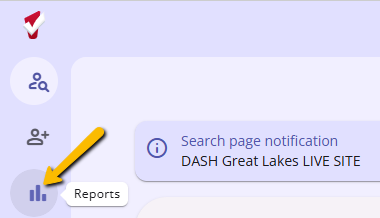
Step 1: On the left side of the screen, click on the Reports icon.
Step 2: Click on the Data Analysis tab.
 Step 3: Click to expand the Dashgreatlakes Clarity System Reports folder.
 Step 4: Scroll to the section entitled "DEHCR" and locate the DEHCR HOME-ARP Supportive Services Data Quality Report. Click Run.
 Step 5: Select your program name in the Program Name prompt. Click Reload.

Downloading the Report
To download the report, click the three dots on the upper right-hand side of the screen and click "Download."
 If you want the report in CSV format, click Download.

If you would rather have the report in PDF format, click the arrow to the right of CSV and choose PDF.

Check the box next to "Expand tables to show all rows" and click "Download."
Copyright © Institute for Community Alliances, 2026. All Rights Reserved.