.png)
DEHCR HOME-ARP CLS Data Completeness
Background
The DEHCR HOME-ARP CLS Data Completeness report is a Looker-based report that highlights HOME-ARP enrollments that are missing Current Living Situation (CLS) Assessments during the reporting period.
As a reminder, these are the Current Living Situation Assessment data collection requirements for the HOME-ARP Supportive Services program:
- A Current Living Situation Assessment must be added at program entry, and for each calendar month that a household remains in the HOME ARP program.
- If a client's living situation has changed, please be sure the date of the Current Living Situation Assessment reflects when the change occurred.
- If you have lost contact with a client and are waiting to see if they resurface before exiting them from the HOME-ARP program, you do not need to document a CLS assessment during the calendar month(s) you lost contact. Simply add a case note indicating that you have lost contact and are trying to reach the client.
Running the Report
- The report is intended to be reviewed before ICA submits the quarterly HOME-ARP reports to DEHCR. The report must be run for a 3-month period. It cannot be run for a shorter or longer reporting period.
When reviewing the report:
- 1st Month corresponds to the 1st month in the reporting period. 2nd Month corresponds to the 2nd month in the reporting period. 3rd Month corresponds to the 3rd month in the reporting period.
- Example: You are running the report for Quarter 1 of 2026 (1/1/2026 through 3/31/2026). The reporting period will be set to 1/1/2026 until 4/1/2026.
- 1st Month = January 2026
- 2nd Month = February 2026
- 3rd Month = March 2026
- Example: You are running the report for Quarter 1 of 2026 (1/1/2026 through 3/31/2026). The reporting period will be set to 1/1/2026 until 4/1/2026.
- If a client has "No CLS" listed for a month, it means they are missing a Current Living Situation Assessment for that calendar month. If the client was still actively enrolled in the program during that month, a CLS assessment dated within that month needs to be added to their enrollment. (Example: if a client has "No CLS" for January 2026, a CLS assessment needs to be added to their enrollment, and needs to be dated sometime between 1/1/2026 and 1/31/2026).
- Reminder - if you lost contact with the client during the calendar month, you do not need to add a CLS assessment during that month. Simply add a case note indicating that you lost contact and are working on reconnecting with the client.
- The latest case note in the enrollment is included in the report to provide additional information for you as you review each file.
- If a client is no longer being served in the HOME-ARP program, be sure to exit them on the appropriate date.
Instructions
Step 1: Click on the Launchpad Icon, and select the Reports icon.

Step 2: Once on the Reports main page click on the Data Analysis tab.
 Step 3: In the Data Analysis tab, click the arrow to expand Dashgreatlakes Clarity System Reports folder.
Step 4: Locate the section entitled DEHCR and click RUN for the DEHCR HOME-ARP CLS Data Completeness report.

Step 5: Select Prompts.
- Reporting Period Filter
- Needs to be set for a 3-month period. This typically will be set to the current/most recent reporting quarter.
- Reminder: when running the report, you need to add 1 day to the reporting period end date.
- Example: if you are running the report for Quarter 1 of 2026 (1/1/2026 through 3/31/2026), the start date will be 1/1/2026 and the end date will be 4/1/2026.
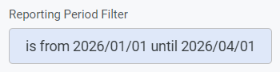
- Example: if you are running the report for Quarter 1 of 2026 (1/1/2026 through 3/31/2026), the start date will be 1/1/2026 and the end date will be 4/1/2026.
- Program Name
- Is set to "contains HOME ARP Supportive Services", and will automatically filter to your agency's HOME ARP Supportive Services program.
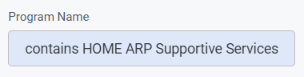
- Is set to "contains HOME ARP Supportive Services", and will automatically filter to your agency's HOME ARP Supportive Services program.
Related Training
DEHCR HOME-ARP CLS Data Completeness Report by Stephanie Van Hulst
Original Training Date: 1.29.2026
Length: 7 minutes 30 seconds