
[GNRL-404] CE Assessment Details Report
Report Purpose and Summary
The Assessment Details Report is similar to the [GNRL-401] VI-SPDAT Details Report. The main difference is it widens out the assessment choices to all assessments designated for Coordinated Entry, not just the VI-SPDAT. This version reports subtotals of the assessment processors, not the details about each assessment field.
Instructions
Make sure you are operating in Clarity under the agency you are running the report for. You can check and change this under your name in the upper right corner.

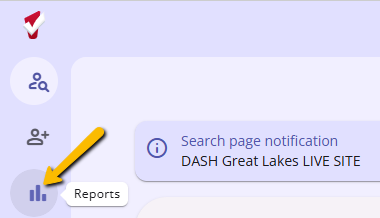
Step 1: On the left side of the screen, click on the Reports icon.
Step 2: In the Report Library, scroll down to Available Reports.
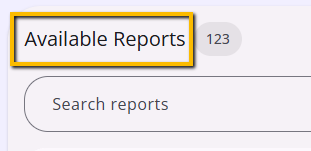
Step 3: In the search bar, type in GNRL-404 and the report will appear below.

Step 4: On the right side of the screen, click on the Run button.

Reporting Parameters
| Assessment(s) | Choose which assessment screen(s) should be included in the report (click the checkboxes to select multiple assessments) |
| User Criteria | Choose 'Based on Assessing User' |
| Assessing User(s) | Choose which staff member(s) to include (click the plus icon to select multiple users) |
| Report Date Range | Choose the assessment date range to include in the report |
| Report Output Format | Web Page, PDF, Excel, Zip with XLS
Note: Zip with XLSX will show all subtotals, other versions will only return up to six subtotals) |
Step 5: Click Submit.

The file will be sent to the Report Queue. Once the report has processed, you will see the number one appear in the Report Queue in the upper right corner of the screen.

To open the report, click the Report Queue icon and then click Open.

Reporting Details
If the report is run for multiple assessment types, each assessment type will have its own section in the report. Each section will include the following information:
- Assessment Date
- Client Last Name
- Client First Name
- Unique ID
- Age
- Gender
- Veteran Status
- CE Household Type: The assessing program enrollment Household type, left blank if no program enrollment is attached to the assessment
- Adults in CE Household: The number of adults in the assessing program enrollment, left blank if no program enrollment is attached to the assessment
- Children in CE Household: The number of children in the assessing program enrollment, left blank if no program enrollment is attached to the assessment
- Referred to Queue (if a referral was made with the assessment)
- Contact Information for Client
- Location Information for Client
- Assessing Program (left blank if no program enrollment is attached to the assessment)
- Staff member that completed the assessment
- Staff member’s home agency
- Assessment Score

Copyright © Institute for Community Alliances, 2026. All Rights Reserved.