
[HUDX-236] LSA - Project Descriptor HDX Upload Test
Report Purpose and Summary
This report is used to prepare for HDX upload without running client data. The purpose is to identify project descriptor issues in the LSA submission process.
Instructions
Make sure you are operating in Clarity under the agency you are running the report for. You can check and change this under your name in the upper right corner.

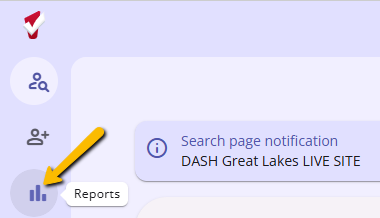
Step 1: On the left side of the screen, click on the Reports icon.
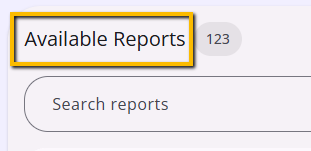
Step 2: In the Report Library, scroll down to Available Reports.
Step 3: In the search bar, type in HUDX-236 and the report will appear below.

Step 4: On the right side of the screen, click on the Run button.

Reporting Parameters
| LSA Scope | Select 'Project-Focused LSA' |
| Project Type(s)
|
Select the Program(s) to include in the report (click the checkboxes to select multiple)
|
| CoC | Select the Continuum of Care |
| Agency Status | Select All Agencies, Active Agencies, or Inactive Agencies |
| Agency(-ies) | Select the agency(-ies) to include in the report (click the plus icon to select multiple) |
| Program Status | All, Active or Inactive |
| Program(s) | Select the Program(s) you would like to include in the report The Program(s) displayed for selection will align with the Program Type(s) and Program Status selected above (click the checkboxes to select multiple) |
| Client ID Selection | Select 'Clarity Unique Identifier' |
| Report Date Range | Enter the date range, for federal reporting the date range will be 10/01/xxxx – 9/30/xxxx |
| Report Output Format | Zip with CSV |
Step 5: Click S ubmit.

The file will be sent to the Report Queue. Once the report has processed, you will see the number one appear in the Report Queue in the upper right corner of the screen.

To open the report, click the Report Queue icon and then click Open.

Reporting Details
1. Run the report for the selected CoC.
2. Upload to HDX per instructions received from HUD.
3. An error report will be returned in HDX: 
4. Ignore the missing files error, this is intentional because the client data was not run.
5. Review and repair any project descriptors errors in the error report.
Once all project descriptor errors are corrected, run the main LSA Report: [HUDX-231-AD] LSA Export - Systemwide [FY 2026].
Copyright © Institute for Community Alliances, 2026. All Rights Reserved.