
[OUTS-205] Program Recidivism
Report Purpose and Summary
This report provides a summary by program type, of destinations and length of time returning to homelessness during the reporting period.To pull into the report, the enrollment must have been exited during the reporting period. An admin report is also available with additional prompts.
Instructions
Make sure you are operating in Clarity under the agency you are running the report for. You can check and change this under your name in the upper right corner.

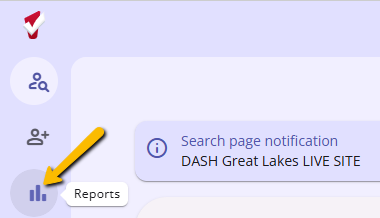
Step 1: On the left side of the screen, click on the Reports icon.
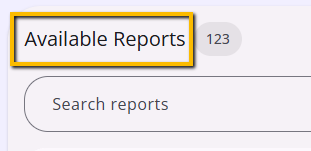
Step 2: In the Report Library, scroll down to Available Reports.
Step 3: In the search bar, type in OUTS-205 and the report will appear below.

Step 4: On the right side of the screen, click on the Run button.

Reporting Parameters
| Project Type(s) | Select the program type(s) to include in the report (click the plus icon to select multiple programs)
|
| Program Status |
|
| Program(s) | Select the program(s) you would like to include in the report. The program(s) displayed for the selection will align with the program type(s) and program status selected above (click the plus icon to select multiple programs) |
| Report Date Range | Enter the date range of enrollments to include |
| Report Output Format | Choose *Web Page, PDF, or Excel |
*Drilldown Functionality is available when run in Web Page Format.
Step 5: Click Submit.
The file will be sent to the Report Queue. Once the report has processed, you will see the number one appear in the Report Queue in the upper right corner of the screen.

To open the report, click the Report Queue icon and then click Open.

Reporting Details
The report is organized by program type and returns the number of clients in the following categories:
- Number of clients who exited
- Number of clients who exited to permanent destinations (refer to HUD HMIS Data Dictionary, Appendix A for a list of destinations)
- Number of clients returning to homelessness
- Of those exiting to a permanent destination, how many returned to a Homeless Program (Emergency Shelter, Safe Haven, Street Outreach, Transitional Housing, PH - Rapid Re-Housing) during the reporting period
- The report will look for returns throughout the Clarity instance, not just the current agency
- Average number of days from program exit to re-entry
- The average number of days till entry in a Homeless Program

Drilldown Functionality
The report has drilldown functionality by clicking on the number of clients by program type and display, you will receive a list of clients. This will include the client’s full name, unique identifier, social security number, and date of birth.

Copyright © Institute for Community Alliances, 2026. All Rights Reserved.